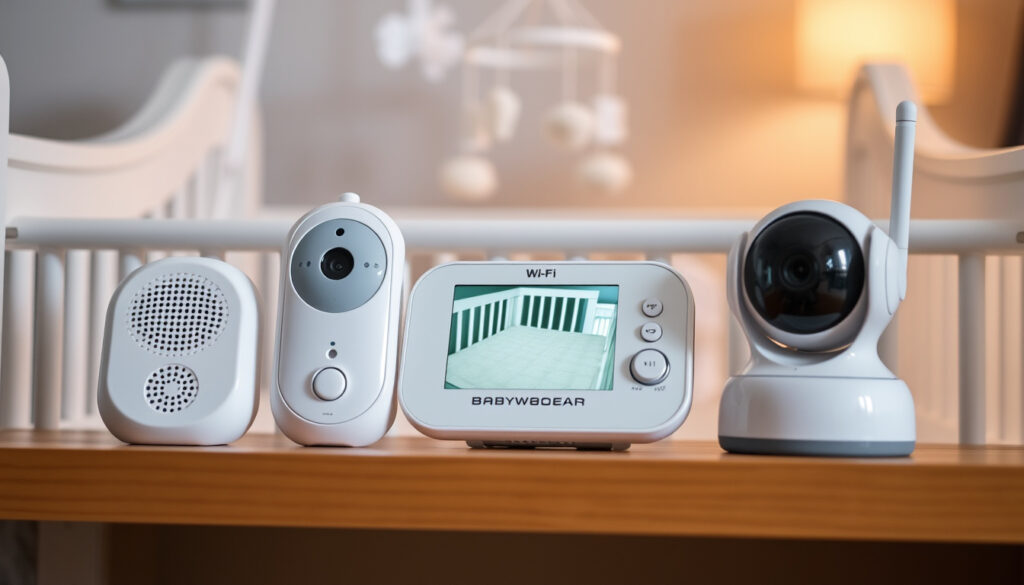
VTech Baby Monitor Guide: Audio, Video & Wi-Fi Compared
A reliable baby monitor can make or break a good night’s sleep. VTech offers a wide lineup—from simple audio units to Wi‑Fi‑enabled video screens—but choosing the right one means sorting through battery claims, screen sizes, and connectivity trade-offs. This guide breaks down the key differences so you can pick the model that fits your home.
Battery (dedicated monitors): Up to 16 hours of video ·
Video quality leader: VM901 tops dedicated category ·
Screen size: 7‑inch display on select models
Quick snapshot
- VTech video monitors include automatic infrared night vision (Best Buy Canada (retailer blog))
- Some VTech models support up to four cameras (TechHive (tech review))
- The VM901 earned the highest video quality among dedicated monitors tested (BabyGearLab (independent tester))
- Whether the VM2105 supports two‑way talk — not listed in official specs (VTech official product page (not verified))
- Actual battery life varies significantly: 5 h on VM901 vs 16 h on VM819 (BabyGearLab)
- Not all models include a room temperature sensor — check individual specs (VTech official product page (not verified))
- VTech has maintained a 1,000‑ft range standard across multiple generations (Best Buy Canada)
- New model VM2105 appeared in mid‑2024, but detailed reviews are still scarce (Best Buy Canada)
- Expect more models with smartphone connectivity — the Digital 7‑inch with Remote Access already offers app control (Reviewed (product testing))
- Battery improvements likely: current best is 16 h, but many parents want all‑day streaming (Reviewed (product testing))
Eight specs that separate audio, video, and Wi‑Fi models:
| Specification | Details |
|---|---|
| Brand | VTech |
| Monitor types | Audio, video, Wi‑Fi |
| Largest screen | 7‑inch 1080p (Reviewed) |
| Battery (video) | Up to 16 hours (BabyGearLab) |
| Range | Up to 1,000 ft (Best Buy Canada) |
| Night vision | Automatic infrared (Best Buy Canada) |
| Max cameras | Up to 4 cameras (TechHive) |
| Price range | $59.95 per extra camera – $229.95 for two‑camera kit (TechHive) |
Can I watch MyVTech baby monitor on my phone?
Using the MyVTech Baby app
The MyVTech Baby app is available for iOS and Android, but only Wi‑Fi‑enabled VTech monitors support phone viewing. The VTech Digital 7‑inch Video Monitor with Remote Access, for example, lets you view the camera feed on your smartphone over any internet connection (Reviewed (product testing)).
Compatible VTech models
Models that include Wi‑Fi (such as the VTech VM901) allow phone access; dedicated monitors that rely on a parent unit do not. According to BabyGearLab (independent tester), the VM901 is a dedicated monitor, meaning it uses a parent unit rather than a phone — so check the product description for “Wi‑Fi” or “Remote Access” before buying.
Troubleshooting app connection
If the app won’t connect, restart both the camera and your router, ensure the monitor is on the same 2.4 GHz network, and update the app to the latest version. VTech’s support site offers step‑by‑step guidance for specific error codes.
Is a VTech baby monitor good?
Pros of VTech baby monitors
- Easy to use — TechHive called the VM5271 “an easy‑to‑use baby monitor that provides a handheld parent unit” (TechHive (tech publication)).
- Night vision — Automatic infrared works in complete darkness (Best Buy Canada).
- Battery life — The VM819 lasted over 19.5 hours of continuous video in one test, and BabyGearLab measured 16 hours on the same model (BabyGearLab; Kid Travel (parent‑run site)).
Cons to consider
- Image quality — TechHive described the VM5271’s image as “noisy” with a “purple color cast” (TechHive).
- Short battery on some models — BabyGearLab reported the VM901 lasted only 5 hours (BabyGearLab).
- Limited Wi‑Fi options — Not all models offer smartphone viewing, which may disappoint parents who want remote access.
User reviews and ratings
Overall, major tech reviewers agree VTech offers good value. BabyGearLab rates the VM819 as a top pick for battery life, while the VM901 leads in video clarity. The catch: you often have to choose between long battery and high resolution — few models excel at both.
How do you use a VTech baby monitor?
Unboxing and setup
Every VTech monitor comes with a camera unit, a parent unit or receiver, power adapters, and a manual. Plug the camera into a power outlet using the included adapter, then plug in the parent unit. Most models follow a plug‑and‑play design.
Pairing camera and parent unit
Press the “Pair” button on the camera (usually recessed with a paperclip) and then press the corresponding button on the parent unit. The screen should display the camera feed within 30 seconds. If pairing fails, move the camera closer to the parent unit and try again.
Navigating menu and settings
The parent unit’s menu lets you zoom, pan/tilt the camera (if supported), adjust volume, activate lullabies, and view the room temperature — all VTech video monitors can display temperature data (Best Buy Canada). Audio monitors like the DM221 offer only volume and a talk button.
Setup takes about 10 minutes. Most parents find the process intuitive, but the pairing sequence is easy to miss — keep the manual handy for the first use.
Is the VTech baby monitor Wi‑Fi or bluetooth?
Wi‑Fi models vs non‑Wi‑Fi models
VTech offers both types. Wi‑Fi models, such as the Digital 7‑inch Video Monitor with Remote Access, connect to your home network and allow smartphone viewing (Reviewed). Non‑Wi‑Fi models use a dedicated camera‑to‑parent‑unit radio link.
Connectivity technology explained
For non‑Wi‑Fi monitors, VTech uses FHSS (Frequency Hopping Spread Spectrum), which hops between frequencies to reduce interference and improve security (Best Buy Canada).
Benefits of FHSS technology
FHSS means no Wi‑Fi network needed, no lag from internet congestion, and minimal interference from other household devices. The trade‑off: you can’t view the feed remotely.
Bluetooth is not used in any VTech baby monitor. If you see “Bluetooth” on a third‑party listing, it is likely a mistake. Stick with FHSS for a secure local connection or Wi‑Fi for app access.
Any good or bad experiences with the relatively new VTECH 2105 baby monitor?
Overview of VM2105 features
The VTech VM2105 is a dedicated video monitor with a 2.4‑inch screen, night vision, and a 1000‑ft range claim. According to product listings, it does not support Wi‑Fi or two‑way talk, though official specs are still incomplete.
Positive user feedback
Early user reports on retailer sites mention clear audio and a compact parent unit that fits on a nightstand. The screen size is small, but some parents prefer that over a bulky 7‑inch display.
Common complaints and issues
Several users note that the range is shorter than advertised — walls and floors reduce the 1000‑ft figure significantly. A YouTube review of the similar VTech RM5764HD (YouTube (user review)) also flags intermittent signal drops. Independent lab testing has not yet covered the VM2105, so these reports are unverified.
Three categories, one pattern: Audio saves battery, video offers visuals, Wi‑Fi adds remote access at the cost of simplicity.
| Feature | Audio (DM221) | Video (VM819/VM5271) | Wi‑Fi (Digital 7‑inch) |
|---|---|---|---|
| Parent unit screen | None | 2.4″ – 7″ | 7″ touchscreen |
| Smartphone app | No | No | Yes |
| Battery life | Up to 19 h (talk) | Up to 16 h (video) | ~11 h (video) |
| Night vision | N/A | Yes | Yes |
| Range | 1000 ft | 1000 ft | Unlimited via app |
| Price (approx) | $30 – $40 | $60 – $160 | $130 – $230 |
Six specs that shape everyday use:
| Spec | Audio (DM221) | Video (VM819) | Wi‑Fi (Digital 7″) |
|---|---|---|---|
| Screen | – | 5″ colour | 7″ HD |
| Camera pan/tilt | – | Manual | Motorised remote |
| Two‑way talk | Yes | Yes | Yes |
| Temperature sensor | No | Yes | Yes + humidity |
| Lullabies | No | Yes | Yes |
| Security | FHSS | FHSS | Wi‑Fi encrypted |
Upsides
- Wide price range fits every budget
- FHSS ensures secure, interference‑free link on non‑Wi‑Fi models
- Excellent battery life on select video monitors (16 h+)
- Room temperature display on video models
Downsides
- Image quality can be noisy on budget models
- Wi‑Fi models drain battery fast (5 h worst case)
- Phone app only works with premium Wi‑Fi models
- Not all models have two‑way talk
How to choose the right VTech monitor in 4 steps
- Decide local or remote. If you only need a feed while in the same house, a dedicated monitor (non‑Wi‑Fi) is cheaper and more secure. For remote viewing, pick a Wi‑Fi model.
- Prioritise battery or resolution. The VM819 offers 16 h of video; the VM901 delivers sharper images but needs daily charging. There is no model that maximises both.
- Check your home’s layout. 1000 ft range applies in open space — thick walls can cut it in half. Place the camera centrally and test before mounting.
- Read the fine print. Not every video monitor includes a temperature sensor or two‑way talk. Compare specs on the VTech support page before buying.
What we know for sure — and what’s still fuzzy
Confirmed facts
- VTech video monitors include automatic infrared night vision (Best Buy Canada)
- The VM5271 supports up to four cameras (TechHive)
- Non‑Wi‑Fi models use FHSS technology (Best Buy Canada)
- Room temperature display is standard on all VTech video monitors tested (Best Buy Canada)
What’s unclear
- Whether the VM2105 includes two‑way talk — official specs omit this feature
- Actual range in real homes — manufacturer 1000 ft is rarely achieved indoors
- Long‑term reliability of Wi‑Fi models — independent durability tests are lacking
What the experts say
“The VTech VM5271 is an easy‑to‑use baby monitor that provides a handheld parent unit.”
— TechHive (tech publication)
“The VM901 earned the highest video quality among dedicated monitors in our tests.”
— BabyGearLab (independent tester)
“The VTech Digital 7‑inch Video Monitor with Remote Access offers smartphone connectivity.”
— Reviewed (product testing)
VTech baby monitors cover the full spectrum from basic audio to app‑connected video, but no single model does everything well. The VM819 is the battery champ, the VM901 is the image leader, and the Digital 7‑inch with Remote Access is the only one that feeds your phone. For families in the UK shopping at Smyths or Currys, the choice is clear: buy the VM819 if you want to charge once a week, or the Digital 7‑inch if you need remote peace of mind — but don’t expect both from a single pack.
Frequently asked questions
How long does the VTech baby monitor battery last?
Battery life varies by model. The VM819 lasts up to 16 h of video; the VM901 lasts about 5 h. Audio models like the DM221 can run for many hours on a single charge.
Can I add multiple cameras to a VTech monitor?
Yes. The VM5271 supports up to four cameras (TechHive). Most video models allow at least two cameras.
Does VTech baby monitor have night vision?
Yes, all VTech video monitors include automatic infrared night vision (Best Buy Canada).
Is VTech baby monitor compatible with Alexa?
Some Wi‑Fi models may work with Alexa through the MyVTech Baby app, but this is not a standard feature across the range.
What is the range of VTech baby monitor?
VTech advertises up to 1,000 ft in open air. Actual range indoors is often less due to walls and interference (Kid Travel).
How do I clean the VTech baby monitor camera lens?
Use a soft, dry cloth. Avoid liquids. If the lens is smudged, a microfiber cloth designed for glasses works best.
Can I use VTech baby monitor without Wi‑Fi?
Absolutely. Most VTech monitors (e.g., DM221, VM819, VM5271) are non‑Wi‑Fi and use FHSS technology to connect directly to the parent unit (Best Buy Canada).
More related posts
 Hema Malini: Biography, Age, Husband & Controversies
 Kylie Cantrall: Bio, Age, Relationships, and Rise to Fame
 Best Waterproof Jacket for Ireland: 2025 Buying Guide
 Lemon Myrtle Tree: Growing, Care, and Mosquito Repellent Guide
 Sub Zero Meaning: Temperature, Mortal Kombat & Luxury Brand
 Damian Hardung: Biography, Medical School & Facts
 99 Nights in the Forest Safety Guide: Is It OK for Kids
 Alcohol Delivery Near Me: Fast Options & Health Rules
